


The Event365 visual calendar is the starting point of any event operation. See in a single screen every space, every booking status (provisional, confirmed, completed), by event type and by month. Client calls interested in a wedding? Booking is created in 30 seconds and the system prevents date clashes. Manage multiple venues or halls? The calendar handles each space independently but with an aggregated view. Online 24/7 on any device.
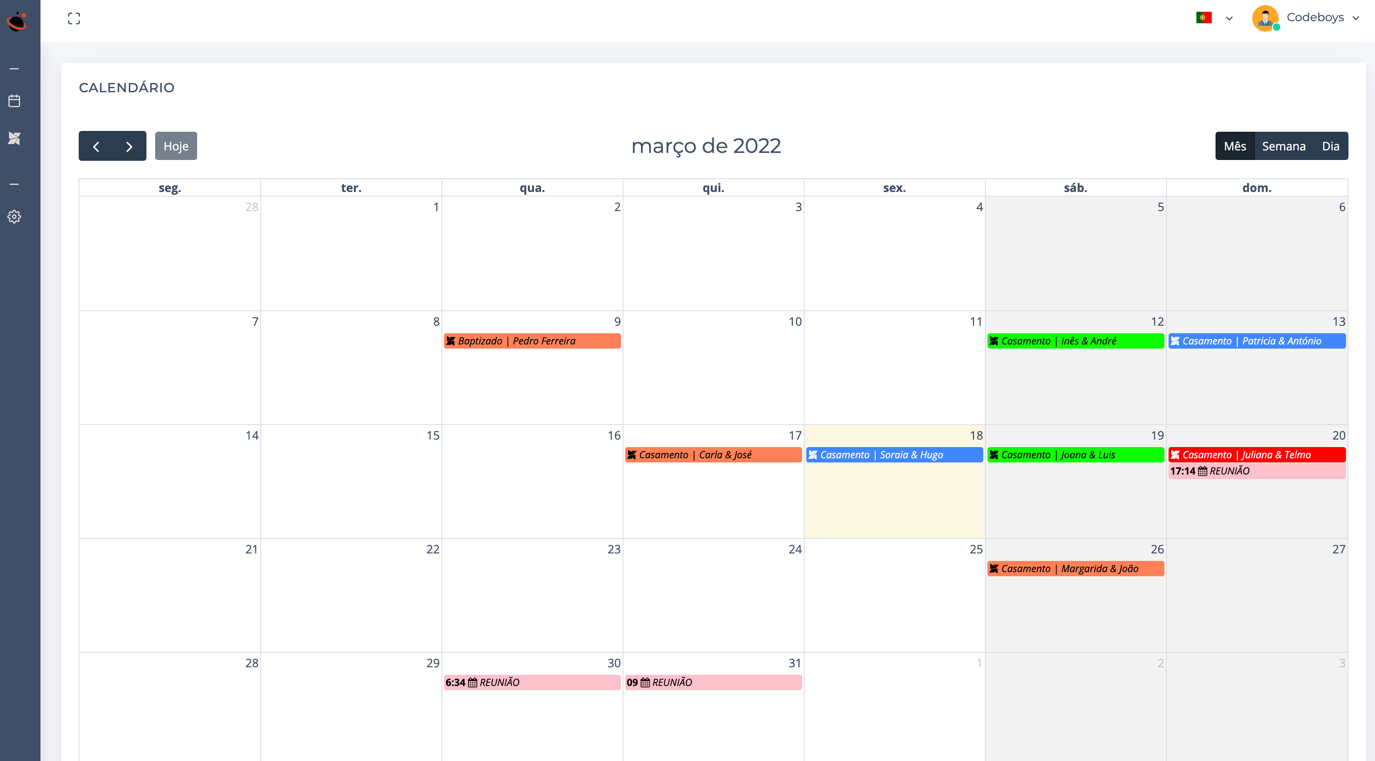
Each space in the venue (Main Hall, Principal Room, Garden…) with its own colour on the calendar, configurable in the backoffice. The statuses — Confirmed, Pending, Rejected — also have visual coding.
Space availability visible immediately. Click on a free date and the new-event form opens with the date and space already filled in. Client on the phone? You book it on the spot.
Several venues or rooms managed by the same owner? A centralised, aggregated calendar with filters by space, event type and status. Each space has its own independent sub-calendar.
Coordination meetings appear next to events, in a distinct colour. Never again miss the final-decisions meeting because it was on a different Outlook.
The calendar is the first thing the team opens every day. So it is transparently cached — it opens instantly, even with hundreds of events in history.
Hovering over an event quickly shows the type, menu, space and number of people. No click, no page change.
Free account, no card. Everything available during the trial period.
Create free accountWhere this feature makes the biggest day-to-day impact.
